Typeshala (टाइपशाला)
Typeshala (टाइपशाला) is a free, open-source typing tutor that teaches English and Nepali typing. It runs natively on Windows, macOS, Linux and needs no account, no subscription and no network connection.
It teaches three layouts from the same set of structured lessons: English QWERTY, Romanized Nepali for people who type नेपाली in Latin letters, and Traditional Preeti — the legacy Nepali key layout that turns familiar QWERTY key positions into Devanagari text.
The original Typshala that Nepali learners used for years is a 16-bit Windows program that no longer runs on a modern 64-bit machine without an emulator. Typeshala rebuilds that tutor as a native desktop app, keeping the layout, the drill structure and the lesson progression, and adding speed and accuracy scoring, progress trends and a bilingual interface.
IN THE APP
What it looks like
One look at the software before you download it.
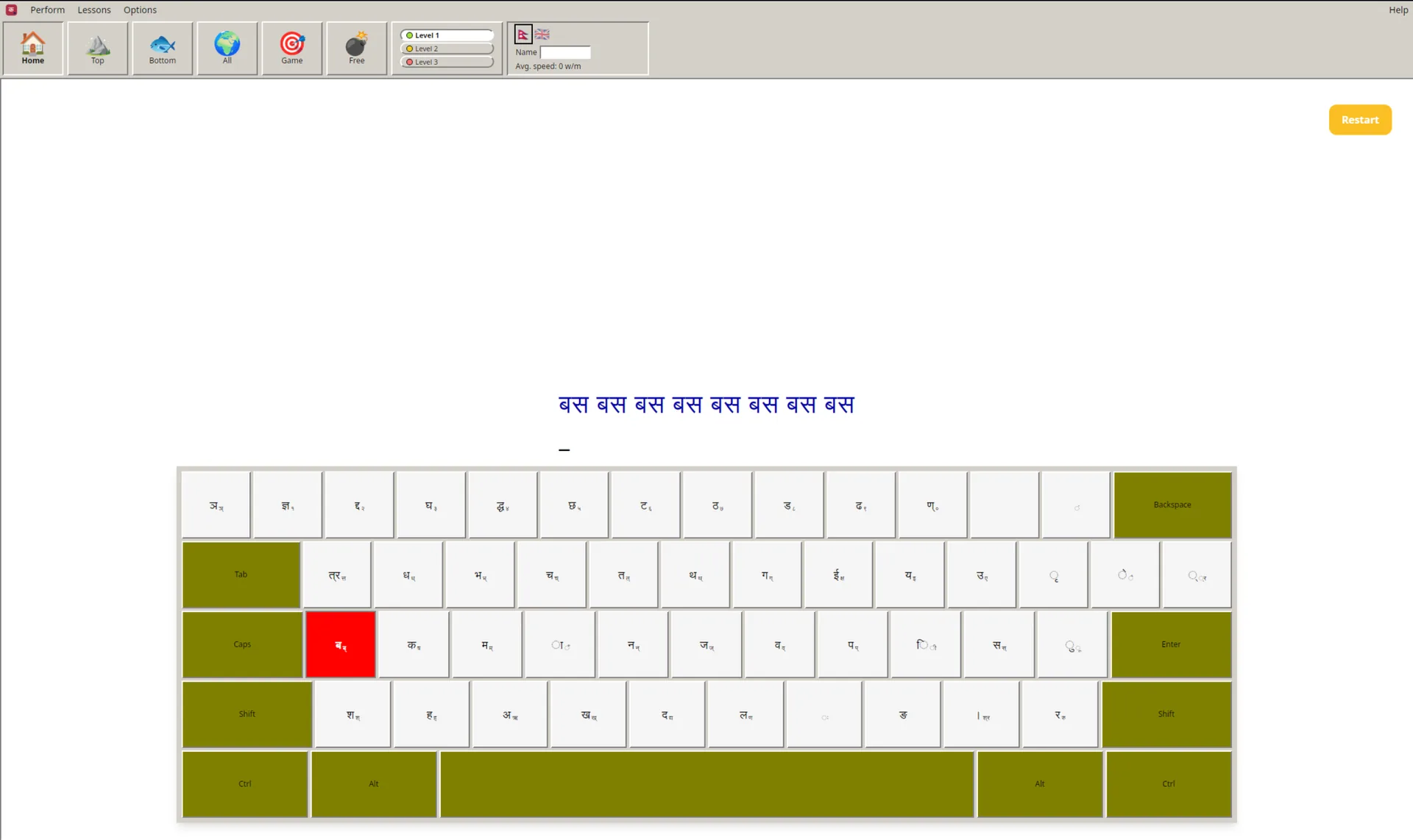
The classic practice screen, rebuilt: a Devanagari prompt line, the on-screen keyboard with its Preeti key labels, and the next required key lit up before you press it.
Desktop
macOS (Apple Silicon)
M1/M2/M3 chips — .dmg installer
Show install instructions
xattr -cr /Applications/Typeshala.app
macOS (Intel)
Intel chips — .dmg installer
Show install instructions
xattr -cr /Applications/Typeshala.app
Windows (.exe)
Windows 10/11 — recommended .exe installer
Show install instructions
Run the .exe installer and follow the setup wizard.
Windows (.msi)
Windows 10/11 — .msi installer
Show install instructions
Run the .msi installer and follow the setup wizard.
Linux (AppImage)
Universal — runs on any distro
Show install instructions
Make executable: chmod +x Typeshala-*.AppImage, then run.
Linux (.deb)
Debian/Ubuntu/Mint — .deb package
Show install instructions
sudo dpkg -i Typeshala_*.deb && sudo apt-get install -f
Linux (.rpm)
Fedora/RHEL/openSUSE — .rpm package
Show install instructions
sudo dnf install Typeshala_*.rpm
Mobile
Android
Touch board build — not published yet
No APK is published yet. Follow the GitLab project for when one is.
Release Notes
RELEASE HISTORY
Previous releases
Earlier builds and the platform downloads they shipped with.
v1.0.1Typeshala v1.0.1
October 1, 2026
macOS (Apple Silicon), macOS (Intel), Windows (.exe), Windows (.msi), Linux (AppImage), Linux (.deb), Linux (.rpm)
Typeshala v1.0.1
October 1, 2026
v1.0.0Typeshala v1.0.0
October 1, 2026
macOS (Apple Silicon), macOS (Intel), Windows (.exe), Windows (.msi), Linux (AppImage), Linux (.deb), Linux (.rpm)
Typeshala v1.0.0
October 1, 2026
WHAT IT DOES
Features
Everything that ships in the Typeshala desktop build.
Bilingual Support
English and Nepali UI with full i18n support
Multiple Layouts
English QWERTY, Nepali Romanized, and Traditional Preeti
Structured Lessons
Progressive typing drills with accuracy and WPM tracking
Progress Stats
Detailed trends, heatmaps, and personal bests
Themes
Light, dark, and custom color schemes
Ramayana Game
Bonus typing game based on the epic
Local-First
All data stored on-device via the Tauri store plugin
No Account, No Tracking
No accounts, no cloud sync, and no network calls at all
Cross-Platform
Native apps for macOS, Windows, and Linux
FAQ
Frequently asked questions
What people usually want to know before they install it.
- Is Typeshala free and open source?
- Yes. Typeshala costs nothing, has no ads, no in-app purchases and no account system. It is released under the MIT license, so you can read, modify and redistribute it. The source lives on GitLab, which is the project's source of truth; GitHub carries the built installers.
- What is the Preeti layout, and does Typeshala support it?
- Preeti is the traditional Nepali typing layout. You press the key positions you learned on the old tutor and Nepali text appears in Devanagari, the standard Unicode form of the script. Typeshala implements that mapping itself rather than relying on a system font or a Nepali keyboard driver, so Preeti typing works the same on Windows, macOS and Linux.
- Can I practise Nepali typing on a Mac or Linux?
- Yes. There are native installers for macOS on both Apple Silicon and Intel, and for Linux as AppImage, .deb and .rpm. The Windows builds ship as both an .exe installer and an .msi package. Every platform runs the same lessons, the same Preeti and Romanized layouts, and the same progress tracking.
- Does Typeshala work offline, and where is my progress stored?
- It works entirely offline. All of your progress, scores and settings are stored on your own device by the app's local store — there are no accounts, no cloud sync and no network calls at all. Uninstalling the app removes your data with it, and nothing about how you type is ever sent anywhere.
- How is this different from the classic Typshala?
- The classic Typshala was a 16-bit Windows program. On a modern 64-bit Windows machine it needs an emulator or a compatibility layer before it will run at all, and it only runs on Windows. Typeshala is a rewrite: same layout, same drill structure, same progression, but built with Tauri, React and Rust so it is a native app on Windows, macOS and Linux, with speed and accuracy scoring, progress trends, themes and a bilingual interface.